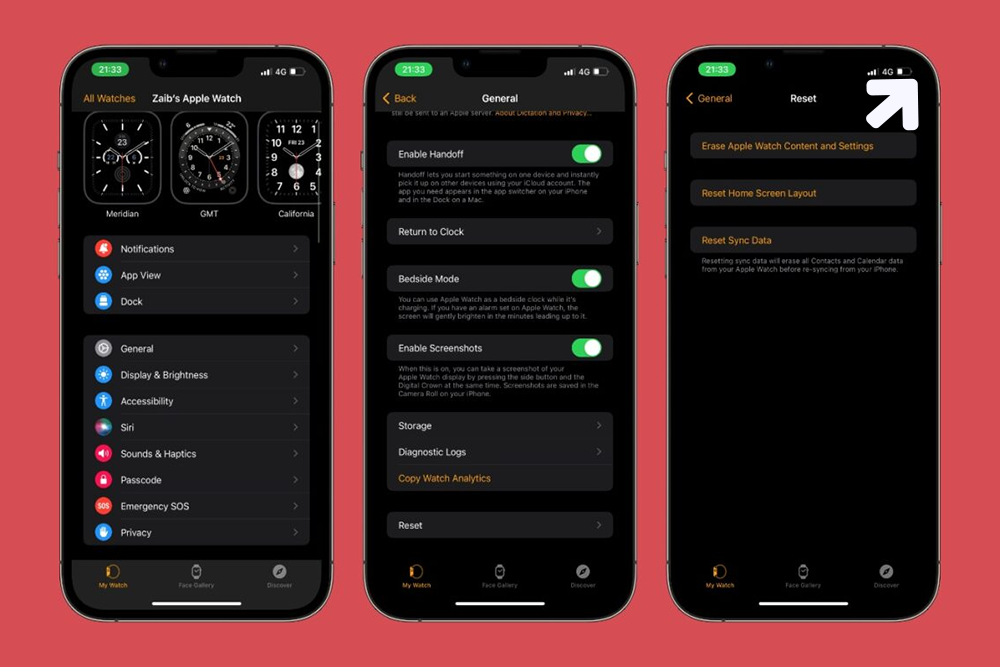
Are you encountering any connectivity issue with your Apple watch? Or, is it a bug that is troubling you? Or, have you forgotten the passcode for the device? Remember too many failed attempts can lock you out from accessing the device.

So, what is the safe way-out amid such circumstances? The solution is quite easy, simply reset the Apple Watch. Resetting the Apple Watch will wipe out all the settings that were previously set by you. Additionally, you will be able to clean all your data and give the Apple Watch a fresh start, with just a single resetting.
In addition to all these possible instances, if you want to buy a second-hand device from someone, then Apple Watch resetting is similarly effective. Now, resetting the Apple Watch to its factory settings is not a difficult task. You can perform the reset using your iPhone.
But, keep in mind that the reset is going to wipe out all the set data on your Apple watch, i.e. you are going to lose messages, settings, including your music preferences. So, decide whether you seriously need to reset your Apple Watch. Well, don’t stop reading, as we are about to share the 3 most important hacks for resetting.
3 Quick & Simple Methods to Reset Apple Watch
If you are thinking that our Apple Watch model might differ from yours, then don’t worry. Every Apple Watch comes with similar resetting methods. So, you can easily reset the Apple Watch by following our instructions.
Before we proceed to reset the watch, make sure that you need to deactivate the Activation Lock. Well, this is complimentary for watchOS2 and higher operating systems. Now, follow the guidelines to turn off the Activation Lock.
- Get your iPhone. Browse to the Apple Watch app. Open up the app. Then, proceed to the tab named My Watch.
- Select your Apple Watch and continue with the Info option. Next, click on the Unpair option.
- Choose for the Remove Plan option. Confirm the process by entering your Apple ID and password.
That’s it. The Activation Lock has now been deactivated. Let’s proceed with the resetting methods of Apple Watch.
 Method 1: Reset Using the Apple Watch
You can use only the Apple Watch to reset itself. First of all, place the Apple Watch on its charger; otherwise, the entire reset process might not work. Now, you can continue with the upcoming guidelines.
- Unlock your device i.e. your Apple Watch, if needed.
- Go to the Settings menu on your Apple Watch.
- You will find a menu named General. Tap that.
- Scroll down the list of menus to find out the option called Reset and tap on the option.
- Choose ‘Erase All Content and Settings’. Next, you must provide the passcode that you got for the secure use of your Apple Watch.
- You can notice a warning. It states that if you continue with the process then you will lose all your data.
Note: It doesn’t mean that you will lose your subscription with your network carrier. To unpair your Apple Watch, tap the Erase All option. If you own the Apple Watch 3 then choose the Erase all and Keep Plan option.
Give your Apple Watch some time to run the entire process and get ready for a new pair-up. Keep your iPhone close to the Apple Watch to pair with it. The reset will let you get rid of the glitches within your Apple Watch. It’s a fresh start and you don’t have to invest in another new Apple Watch.
But what if the process fails! You get two recommendable options to choose from. Either proceed with the next hack. Or, seek prompt assistance from experts who have immense knowledge in Apple Watch Repair.
Method 2: Reset Using iPhone
In case, you don’t want to reset your Apple Watch using the Watch, then you have to use your paired iPhone. If you haven’t set the Activation Lock, then you have to use this method as an alternative means.
Make sure that the Apple Watch is already paired with the iPhone before you start off the method. Keep those devices close together.
- Launch the Apple Watch application from the iPhone
- Navigate to the tab named My Watch. You can observe your Watch at the top of the screen. Tap on that option.
- Next, tap the Info button beside your Watch.
- Choose the Unpair Apple Watch option.
- If you have got GPS+Cellular plans, then it’s up to you whether to keep them or not.
Note: If you decide to pair these devices again then, keep up the plan. Otherwise, you can proceed with canceling the existing plan after contacting your service provider if you want a different network plan.
- After tapping the right option, now confirm the whole process, again. Provide your Apple ID password to turn off the Activation Lock.
Your iPhone already creates a backup of the Apple Watch before removing all data and content from your Apple Watch. You can use the backup to restore all the data on a new Apple Watch. Now, your iPhone is ready to pair up with another Apple Watch.
Also Read: Display Instagram photos in WordPress on a budget
Method 3: Reset the Passcode on Apple Watch
If you have forgotten the passcode of your Apple Watch, then you can reset the passcode by using the following instructions.
- Place your Apple Watch on charging while performing the task.
- Press the Side button of the Watch. Don’t release until you notice the Power Off option.
- Press the Power Off option. Select ‘Erase All Content and Settings’.
Wait till the process finishes, your Apple Watch will then be ready for a new pair-up with a new passcode. Just opt for the Restore option when prompted.
That is all about resetting an Apple Watch. Hopefully, you can successfully reset your Apple Watch from your iPhone. However, it is always advisable to leave the DIY methods if you are not acquainted with gadgets’ functions. You should always opt for the best-suited measure.
 16+ Years of Tech Mastery
Transforming Ideas into Market Ready Platforms |
16+ Years of Tech Mastery
Transforming Ideas into Market Ready Platforms |