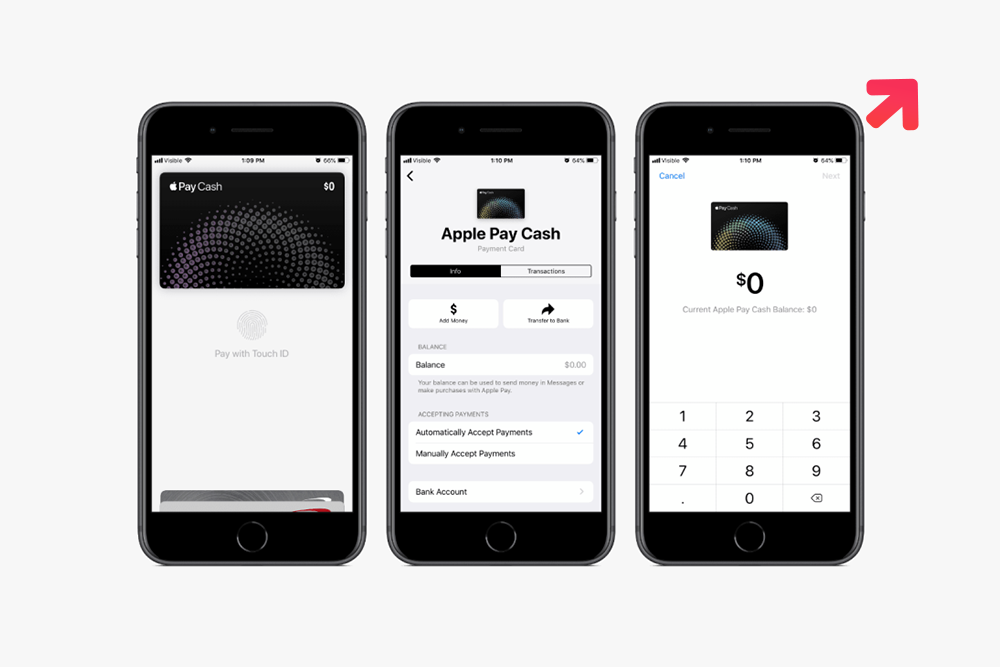
Nowadays a payment gateway is one of the most significant things that everyone needs to set up in their mobile device. In case you are running a business then you cannot succeed without integrating an app. It will not only boost your sales rate but also helps in improving customer experience with your services. When you plan to develop a mobile app for business considers integrating Apple Pay in the iOS app. The mobile apps that offer easy payment procedures are easy to use and enhance the customer experience.

Apple pay allows its users to easily shop online, and offer various benefits to make payments with the help of NFC (Near Field Communication) Technology. The app is completely safe to use with Touch ID and Face recognition technologies used for payment approval.
Here, in this blog, we are going to discuss the procedure to integrate apple pay into the mobile applications which are already developed and need payment gateway integration.
Why Mobile apps Need Payment Gateway Integration?

The integration of the apple payment app makes all your payments easy with its unique Face recognition technology, which lets you shop for things with one click. With Apple Pay integration in your iOS apps, you can send payments to anyone right through your Messages or Siri. It offers you complete security as you don’t need to carry your credit and debit cards every time with you while shopping. The app manages cards and sends cash right in friction of seconds. Apple Pay is one of the safest mobile apps for the payment method as it provides users with 2 step authentication and a unique code. There is no need to store your card number on the device as with the rising cyber threats people are more concerned about their information safety.
How to integrate Apple Pay in Your mobile App?
To set up Apple Pay integration in your mobile apps you need Swift 4 language to execute the task. Following are the steps to add Apple Pay in your apps:
Create a Merchant ID

To start the process, first of all, you need to navigate to https://developer.apple.com and then you need to sign in to your developer account.
After this find the way to Identifiers, Certificates, and Profiles. Now go to the Identifier option and select App ID.
Choose the simple ID, because if it isn’t clear, then you cannot make payment with your app.
After selecting the ID tap on the continue option and Submit.
The creation of your new App ID is complete!
Now it is time to navigate to the Merchant ID section. Here tap on the + icon. It is a place you have to write a short description you want, to create a Bundle ID for your app in which you want to use the apple pay feature. Start the id With the word “merchant.” For example – “merchant.com.XYZcompany.yourapp”

Build up Apple Pay capabilities in Xcode for your project
After the successful completion of your Merchant ID, now it is time to open up your project in Xcode and select Capabilities under the .xcproject section.
Now turn on the Apple Pay and write your Merchant ID and make sure that the toggle of the Apple pay from the right side is kept on.
Then, you need to add your ID to the developer gateway and make certain that the Team Box is representing to the right time and test out all items mentioned are correct.
Create a Gmail account for connecting in iTunes
It is time to create a Gmail account. Once the complete the above steps, go to https://itunesconnect.apple.com/. Here tap on the users and roles option and tap on the “+” icon. Pick a country where you want to enable Apple Pay in your app. It is the time when you confirm your new Gmail created by Apple ID.
Add a test card
Now it is time to logout from the Apple ID and uses the sandbox account. To test the ID you need to follow a test card step by adding the following details :
FPAN: 5233 2477 5777 1505
Expiration Date: 12/2026
CVC: 999
Create payment from Apple ID
To check the integration process create a payment request, add any button from the storyboard to the View Controller option to execute the step.
after that, connect IBAction with your ViewController.swift. To make your Apple Pay work efficiently, you must add the following line into ViewController:
Import PassKit
Now, you can build up the payment request in purchase item():
@IBAction func purchaseitem(_ sender: Any) {
let request = PKPaymentRequest()
request.merchantIdentifier = “merchant.net.mobindustry.likeMe”
request.supportedNetworks = [PKPaymentNetwork.visa, PKPaymentNetwork.masterCard, PKPaymentNetwork.amex]
request.merchantCapabilities = PKMerchantCapability.capability3DS
request.countryCode = “US”
request.currencyCode = “USD”
request.paymentSummaryItems = [
PKPaymentSummaryItem(label: “Some Product”, amount: 9.99)
]
let applePayController = PKPaymentAuthorizationViewController(paymentRequest: request)
self.present(applePayController!, animated: true, completion: nil)
}
Handle the output
You need to add the following line to purchaseItem():
You need to add the following line to purchaseItem():
applePayController?.delegate = self
After that, make the following extension:
extension PaymentViewController:
PKPaymentAuthorizationViewControllerDelegate{
func paymentAuthorizationViewControllerDidFinish(_ controller: PKPaymentAuthorizationViewController) {
controller.dismiss(animated: true, completion: nil)
}
func paymentAuthorizationViewController(_ controller: PKPaymentAuthorizationViewController, didAuthorizePayment payment: PKPayment, handler completion: @escaping (PKPaymentAuthorizationResult) -> Void) {
completion(PKPaymentAuthorizationResult(status:PKPaymentAuthorizationStatus.success, errors: []))
}
}
Lastly, check whether you have done all the things in the right manner. Make your Apple Pay integration process successful into your iOS mobile app, so that you can make a flourishing payment using your MasterCard, Visa, or any other card.

To complete the payment, put in the following line in the didAuthorizePayment method:
completion(PKPaymentAuthorizationResult(status:PKPaymentAuthorizationStatus.success, errors: []))
Also Read: What is NFC and how it works?
Conclusion
Hopefully, these 6 steps help you in making a successful payment option in your mobile application. It is the best way to integrate Apple payment technology into an iOS app. Make certain to follow the above-mentioned steps carefully, and you can even hire app developers from this task and discussed your Apple Pay integration requirements to make the payment process easier. Moreover, in case you have an iOS app idea, then you can discuss it with our experts. Our team of experts is ready to help you with the mobile app development services. For more assistance, you can connect with us and our experts will clear all your doubts regarding any platform you choose.


 16+ Years of Tech Mastery
Transforming Ideas into Market Ready Platforms |
16+ Years of Tech Mastery
Transforming Ideas into Market Ready Platforms |