JavaScript Object Notation, abbreviated as JSON, is a lightweight data format for storing information in apps or transferring data between servers and webpages. These files often become heavy. A few more fields, longer arrays, and extra metadata overload the file. It makes the apps run slowly. Also, screens take longer to load, interactions pause, and data processing feels delayed.
These problems are not always due to the code alone. The size of the JSON file and structure also play a direct role in how smoothly an app runs. Let’s have a better understanding of how large JSON files affect app performance in this blog.
Why JSON File Size Matters
JSON files are easy to read and allow easy editing. This makes them popular for APIs and exchanging data. But the issue with them is that their size can grow fast. Large JSON files take more time to download, parse, and process. Each additional kilobyte adds to network time and memory use.
This becomes more visible on low-powered devices or slower connections. Even fast servers can sometimes struggle while handling multiple responses at once.
The following are some of the most prominent performance impacts of large JSON files on app performance.
Slower Network Transfers
When an application fetches a large JSON file, the first delay occurs during the transfer. If the file size is large, more data travels over the network. This increases the load time, more prominently on mobile networks.
If the app depends on multiple JSON files, the delay adds up. Users might see loading spinners or incomplete data while waiting.
Increased Parsing Time
Once the JSON file is downloaded, the app has to convert it into a usable format. This process is known as parsing. However, when the file size is big, it takes much longer and uses more memory.
In web applications, if this happens, it can block the main thread if it is done synchronously. In mobile apps, it may cause small stutters or frame drops. Even if you have a fast network, the app can still feel slow due to extra processing.
Higher Memory Usage
JSON files stay in memory while the app works with them. If the data has multiple nested objects or long arrays, the memory use increases. And if the devices have limited RAM, there is an increased risk that the apps can crash on such devices.
Increased memory usage also affects other tasks. The background tasks may struggle, and switching between apps feels less smooth. With time, this can reduce the overall app stability.
Unnecessary Data Overhead
Large JSON files may include data that the app never uses. This can include extra fields, debug information, and default settings sent with every request. Although every item may seem small, together they add unnecessary weight to the file.
This extra data increases download size, parsing time, and memory use without adding any real benefit. Over time, it becomes a hidden reason behind slow responses. Also, this can cause heavier app behavior, especially as features continue to grow.
The following are some useful ways to reduce the JSON file size, which in turn improves app performance.
Reducing Payload Size at the Source
One way to improve JSON performance is to send less data in the first place. By default, many APIs return full objects, even when only a small portion is actually required by the client. This increases the transfer time and parsing overhead.
To make this better, shape responses around real usage. If a list only displays a title and status, there is no need to add nested settings, timestamps, or related records. This helps in keeping the payloads focused.
For example, instead of returning a full record:

You can only return what the UI needs, as shown below.

This can improve the response size and speed of both the network transfer and parsing.
Splitting Data and Loading It Gradually
Large JSON responses often try to do much at once. So sending everything in a single request increases the wait time and delays rendering. However, a better way is to break data into smaller responses and load them as required.
Pagination is a common example of splitting data. In this, the server, instead of returning thousands of records, returns a limited set and loads more when required. This reduces load time and helps the app feel more responsive.
The following is a simple API pattern for paginated responses:
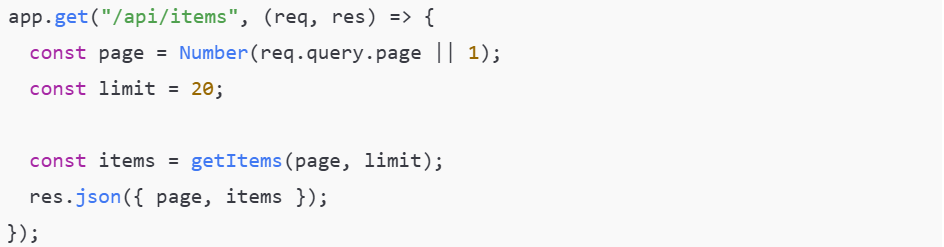
The above image shows how pagination works in an API. The server sends data in small sets rather than returning a large JSON file at once. Each request fetches only the required page, which helps reduce load time and keeps the app responsive.
JSON files are often formatted with indentation and line breaks to make them easier to read. Although this formatting improves readability, it increases the file size and adds unnecessary work for the app in production. However, this improved readability only benefits humans, not machines.
By minifying JSON in production, you can remove extra spaces, line breaks, and formatting characters. This reduces the payload size and improves the speed of both network transfer and parsing while keeping the function the same. Doing it manually may consume much time and effort. To save time, you can do it through JSON minify tool that cleans up formatted JSON without changing the data itself.
Let’s take a formatted JSON file and pass it through JSON minify tool to see the difference.
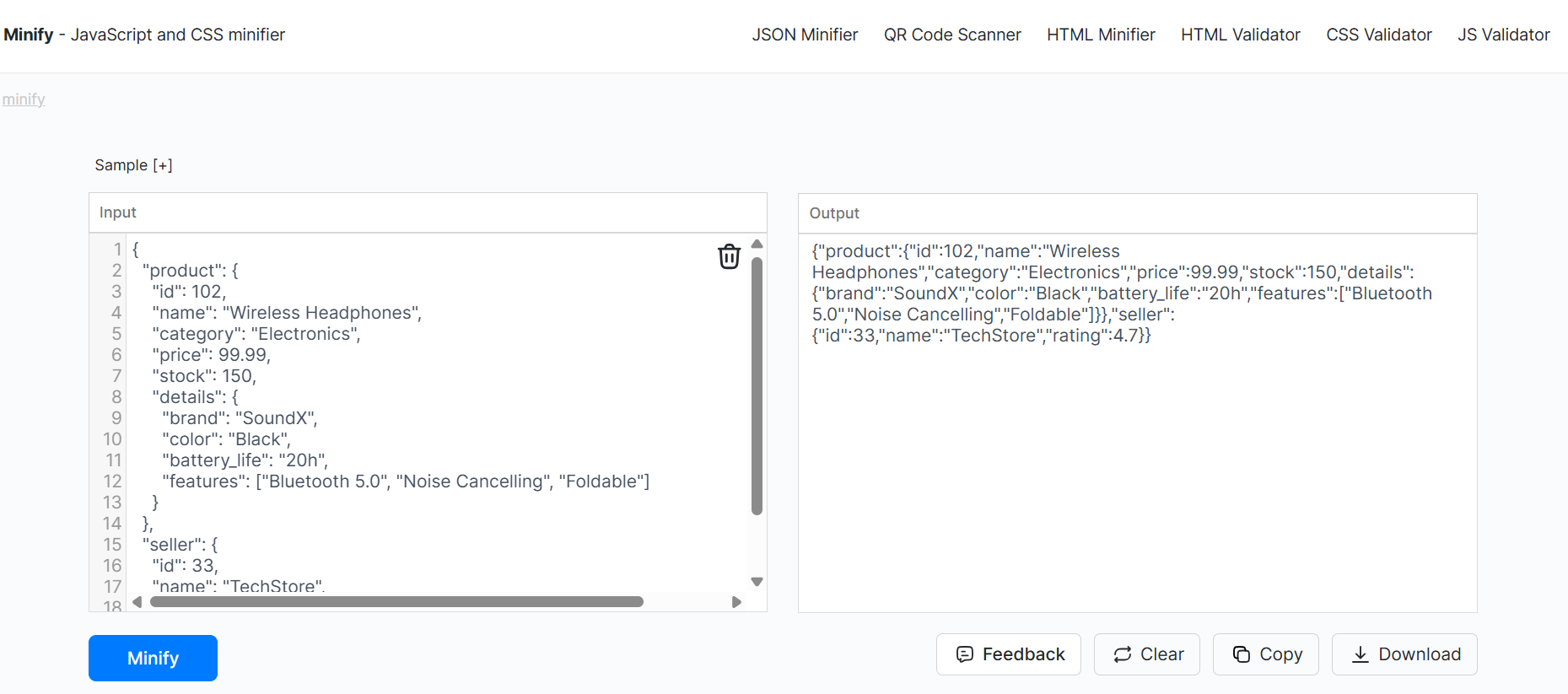
You can see above that I gave a bulky JSON to the tool. It kept all data intact but removed spaces, line breaks, and indentation. The file became smaller, faster to transfer, and quicker for the app to parse.
Continuous Monitoring
JSON performance issues usually grow gradually. When you keep adding features to it, responses increase, and parsing takes longer. These issues can increase silently if you don’t monitor them regularly.
Logging payload sizes during development helps catch problems early. Also, testing on slower networks and devices with low memory exposes issues that may not show up on powerful machines. Monitoring JSON size, memory use, and parse time as part of regular development helps find performance problems early.
Final Thoughts
Large JSON files affect app performance in multiple ways. It affects the download time and memory usage. The apps may feel slow to load and sometimes unresponsive. Usually, these issues are caused by extra data, deep nesting, and unnecessary formatting.
Most of these issues are fixed in simple ways, like splitting data into smaller responses, simplifying the structure, removing formatting, and applying minification where it fits. All these fixes are explained above. Try a few and check how these speed up your app and improve the experience for users.
 16+ Years of Tech Mastery
Transforming Ideas into Market Ready Platforms |
16+ Years of Tech Mastery
Transforming Ideas into Market Ready Platforms |